LogixGRID | Logistics and Warehouse Automation Platform




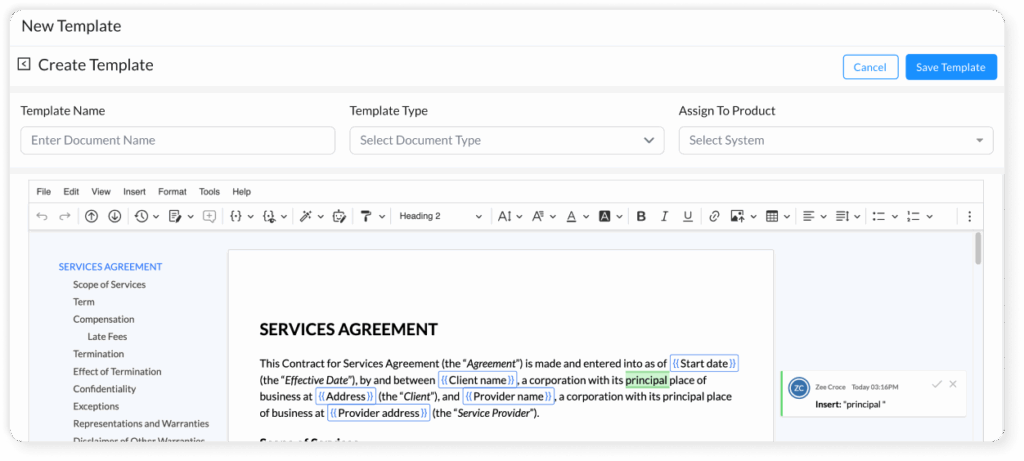


Build once, reuse forever — create rich templates with placeholders ({{shipment_id}}, {{customer_name}}) so documents are consistent and fast.
Pull shipment and customer data automatically to populate documents and eliminate manual entry.
Email fixed PDFs or share a web viewer link with expiry/password and recall capability for full control.
Route documents for approval, capture approvals/rejections with comments, and keep an immutable activity log.
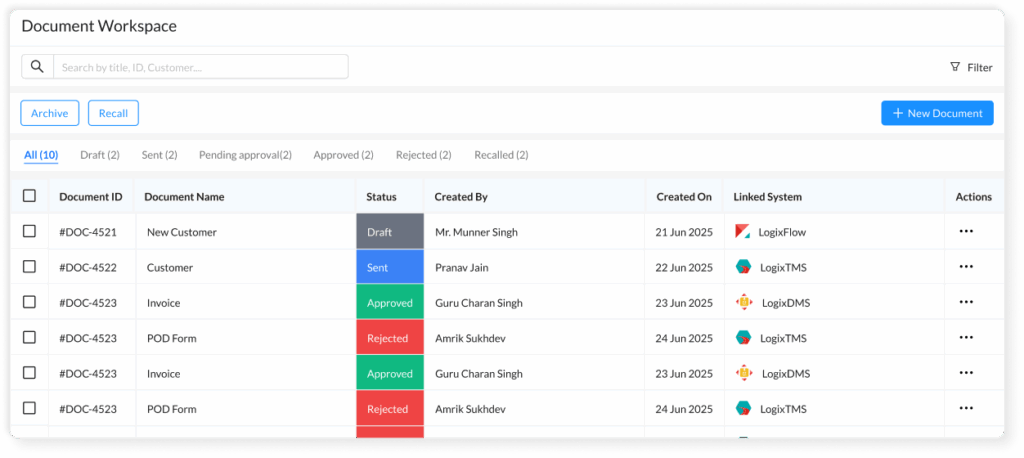
Search, preview, and manage all documents and templates — filter by status, shipment, or tags and act in bulk.
Native connection with FreightNX, TMS and DMS so templates and documents link directly to shipments and operations.
LogixDocs is built for logistics workflows — with template placeholders, shipment linking, auto-fill, approvals, and activity logs that generic tools do not support.
Yes. You can upload your existing templates or build new ones with our visual editor.
Yes. When linked to TMS or DMS systems, fields can be refreshed or re-generated.
Absolutely. You can assign approvers, define access permissions, and even recall links.
Yes — the Document Repository lets you search across all document statuses, tags, and linked systems.
| Cookie | Duration | Description |
|---|---|---|
| cookielawinfo-checkbox-analytics | 11 months | This cookie is set by GDPR Cookie Consent plugin. The cookie is used to store the user consent for the cookies in the category "Analytics". |
| cookielawinfo-checkbox-functional | 11 months | The cookie is set by GDPR cookie consent to record the user consent for the cookies in the category "Functional". |
| cookielawinfo-checkbox-necessary | 11 months | This cookie is set by GDPR Cookie Consent plugin. The cookies is used to store the user consent for the cookies in the category "Necessary". |
| cookielawinfo-checkbox-others | 11 months | This cookie is set by GDPR Cookie Consent plugin. The cookie is used to store the user consent for the cookies in the category "Other. |
| cookielawinfo-checkbox-performance | 11 months | This cookie is set by GDPR Cookie Consent plugin. The cookie is used to store the user consent for the cookies in the category "Performance". |
| viewed_cookie_policy | 11 months | The cookie is set by the GDPR Cookie Consent plugin and is used to store whether or not user has consented to the use of cookies. It does not store any personal data. |